Stop sharing
your password.
Share access instead.
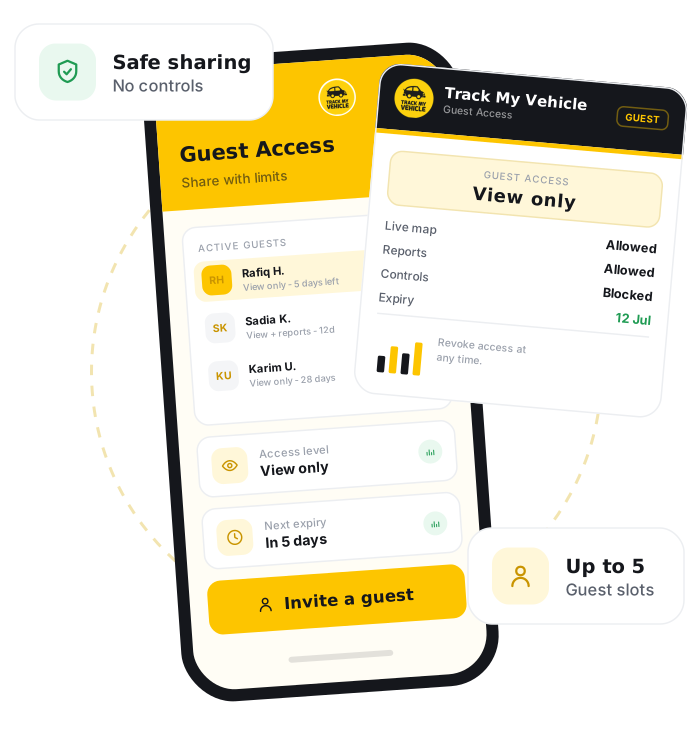
Guest User Login is a feature that lets the main account holder give someone limited, view-only access to a vehicle's tracking, without sharing the primary login or full control. It is how families and businesses let trusted people follow a vehicle while keeping the account secure.
GPS Certificate
Verify your vehicle details
DM-GHA-XX-XXXX
Connected
31 Dec 2026
System generated.
GPS connected
Print and keep
Guest User Login lets an owner share limited, view-only tracking access with trusted people without handing over the main account, so others can follow a vehicle while full control stays with you.
Share the view, keep control.
Not everyone who needs to see a vehicle should control the account. Guest access gives the right people a window in, and no more.
View-only tracking
Guests can follow a vehicle's live location without changing any settings or controls.
No password sharing
Give access without handing over your main login, keeping your account secure.
Family peace of mind
Let family members follow a car, school van or bus so everyone knows it is safe.
Business sharing
Give managers or clients visibility of specific vehicles without full account access.
Revoke anytime
Remove a guest's access whenever you choose, instantly and without affecting your account.
Any device
Guests can view tracking from the web dashboard or the mobile app.
Add a guest in a few taps.
If your vehicle already runs on Track My Vehicle, you can invite a guest straight away.
Log in
Sign in to the Track My Vehicle app with your main account.
Open user access
Go to the guest or user access section.
Add a guest
Enter the guest's details to invite them.
Choose the vehicle
Select which vehicle the guest can view.
Set view-only access
Confirm the guest has view-only permissions.
Share or revoke
Share access, and revoke it anytime you choose.
Frequently Asked Questions
What is Guest User Login?
Can a guest change my settings?
Do I have to share my password?
Can I remove a guest later?
Who is guest access useful for?
Related Features
Live Tracking
Live GPS tracking shows your vehicle's exact location, speed and direction in real time, updating every few seconds on web and mobile across Bangladesh.
Geofencing
Geofencing draws virtual map boundaries and sends instant alerts when a vehicle enters or leaves a zone, keeping fleets inside approved areas across Bangladesh.
Drive Mark
Drive Mark scores driver behaviour, overspeeding, harsh braking and harsh acceleration, into a clear safety rating with actionable feedback for safer fleets in Bangladesh.
Engine Lock
Engine Lock remotely immobilises a vehicle from the app as an anti-theft safeguard, engaging only at rest to safely stop a stolen vehicle in Bangladesh.