Stop watching
the map all day.
Let the zone alert you.
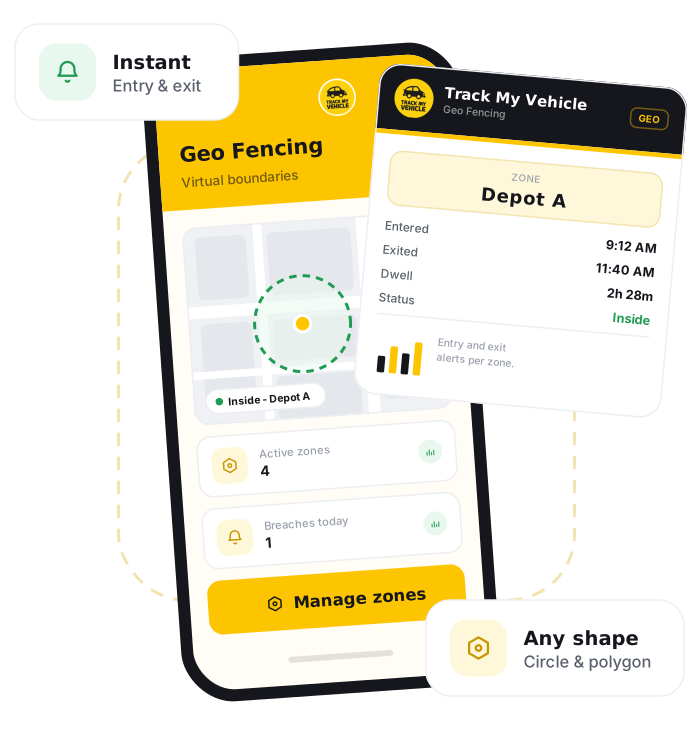
Geofencing is a feature that lets you draw a virtual boundary around any area on the map, such as a depot, route or restricted zone. Track My Vehicle then sends an automatic alert the moment a vehicle enters or leaves that boundary, so you can enforce approved areas without watching the map yourself.
GPS Certificate
Verify your vehicle details
DM-GHA-XX-XXXX
Connected
31 Dec 2026
System generated.
GPS connected
Print and keep
Geofencing lets you draw virtual boundaries on the map and receive an instant alert whenever a vehicle enters or leaves a zone, so unauthorised movement is flagged automatically without constant monitoring.
Let your map do the watching.
You cannot watch every vehicle every minute. Geofencing turns your approved areas into rules, and tells you the moment one is crossed.
Custom boundaries
Draw geofences around depots, routes, delivery areas or restricted zones in a few clicks.
Entry & exit alerts
Get an instant notification the moment a vehicle enters or leaves a defined zone.
Unauthorised use
Spot vehicles going off-route or leaving approved areas outside working hours.
Route adherence
Confirm vehicles are staying on their assigned routes and serving the right areas.
Site control
Know exactly when vehicles arrive at and leave client sites, depots or checkpoints.
Alerts anywhere
Receive geofence alerts on the web dashboard and the mobile app, wherever you are.
Set a zone in a few taps.
If your vehicle already runs on Track My Vehicle, you can create geofences straight away.
Log in
Sign in to the Track My Vehicle app or web dashboard.
Open Geofencing
Go to the geofencing section on the map.
Draw the boundary
Mark the area you want to monitor on the map.
Name the zone
Give the geofence a clear name, such as a depot or route.
Choose alert type
Select whether to be alerted on entry, exit, or both.
Save and monitor
Save the zone and start receiving automatic alerts.
Frequently Asked Questions
What is geofencing?
What can I use a geofence for?
Do I get alerts for both entry and exit?
How many zones can I create?
Where do geofence alerts appear?
Related Features
Guest User Login
Guest User Login shares limited, view-only vehicle tracking with trusted people without giving away your main account, ideal for families and businesses in Bangladesh.
Live Tracking
Live GPS tracking shows your vehicle's exact location, speed and direction in real time, updating every few seconds on web and mobile across Bangladesh.
Drive Mark
Drive Mark scores driver behaviour, overspeeding, harsh braking and harsh acceleration, into a clear safety rating with actionable feedback for safer fleets in Bangladesh.
Engine Lock
Engine Lock remotely immobilises a vehicle from the app as an anti-theft safeguard, engaging only at rest to safely stop a stolen vehicle in Bangladesh.