Stop estimating
mileage.
Start measuring it.
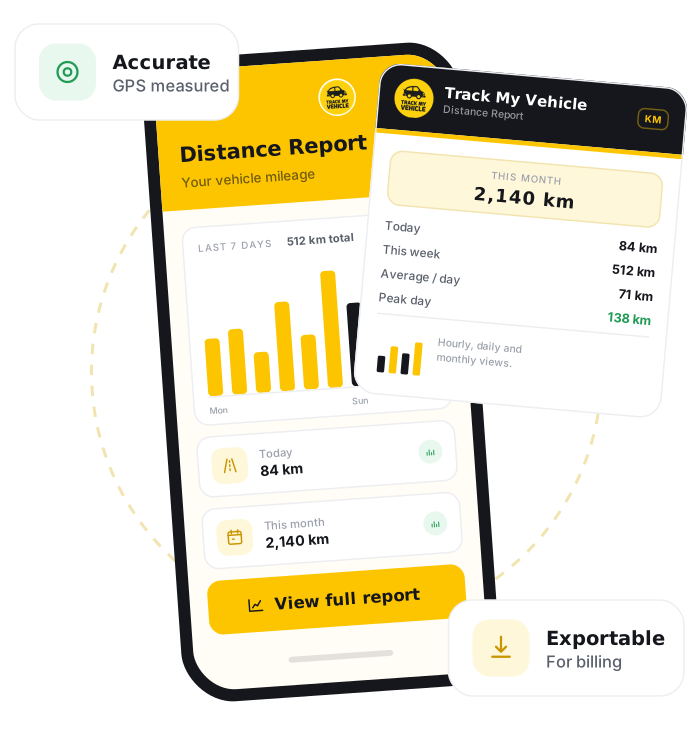
A distance report is a summary of the total distance a vehicle has travelled over a chosen period. Track My Vehicle builds it directly from GPS data across hourly, daily and monthly timelines, so you get accurate mileage for billing, maintenance scheduling and fleet planning, on the web dashboard or the mobile app.
GPS Certificate
Verify your vehicle details
DM-GHA-XX-XXXX
Connected
31 Dec 2026
System generated.
GPS connected
Print and keep
A distance report shows the total kilometres a vehicle has travelled over a chosen period. Track My Vehicle measures this directly from GPS data, not the odometer, so your mileage stays accurate and tamper-proof for billing, payroll and maintenance.
Turn distance into decisions.
Your vehicles are already moving. The distance report shows exactly how far, when and how often, so every kilometre becomes something you can plan around.
Flexible timelines
See distance travelled by the hour, day or month, so you can zoom from a single shift to a full month in one tap.
Accurate GPS mileage
Distance is calculated from GPS data rather than the odometer, giving tamper-proof figures you can trust for billing and records.
Fleet-wide analytics
Compare vehicles across your fleet, spot which ones work hardest, and find idle assets that quietly cost you money.
Smarter maintenance
Schedule servicing on real distance driven, not guesswork, so nothing gets over-serviced or missed.
Bill on real mileage
Logistics and rental businesses can charge on exact distance covered, backed by clear, exportable records.
Web and mobile
Pull the same reports from the web dashboard or the mobile app, whenever and wherever you need them.
A full report in under a minute.
If your vehicle already runs on Track My Vehicle, your distance data is ready to view and export right away.
Log in
Sign in to the Track My Vehicle app or web dashboard.
Open your vehicle
Select the vehicle or fleet you want to review.
Go to Reports
Open the Reports section from the menu.
Pick Distance Report
Choose the distance report from the list.
Choose a timeframe
Select hourly, daily or monthly, and set your date range.
View or export
See the summary and export it whenever you need a copy.
Frequently Asked Questions
What is a vehicle distance report?
Is distance measured from GPS or the odometer?
Can I see distance for my whole fleet?
Which timeframes does the report cover?
Can I export or download the report?
Related Features
Fuel Reports
Fuel Report estimates each vehicle's fuel usage from the distance it travels and the mileage you set per vehicle, helping fleets in Bangladesh track fuel consumption and control costs, with no risky fuel sensor required.
Trip Report
Trip Report breaks vehicle activity into individual journeys with start, end, distance, duration and stops, helping fleets in Bangladesh review trips and bill accurately.
Engine Reports
Engine Report shows when a vehicle's engine was on or off and for how long, including idling, helping fleets in Bangladesh cut fuel waste and track engine hours.
Location Report
Location Report is a timestamped history of everywhere a vehicle has travelled, letting fleets in Bangladesh verify visits, resolve disputes and review any past journey.